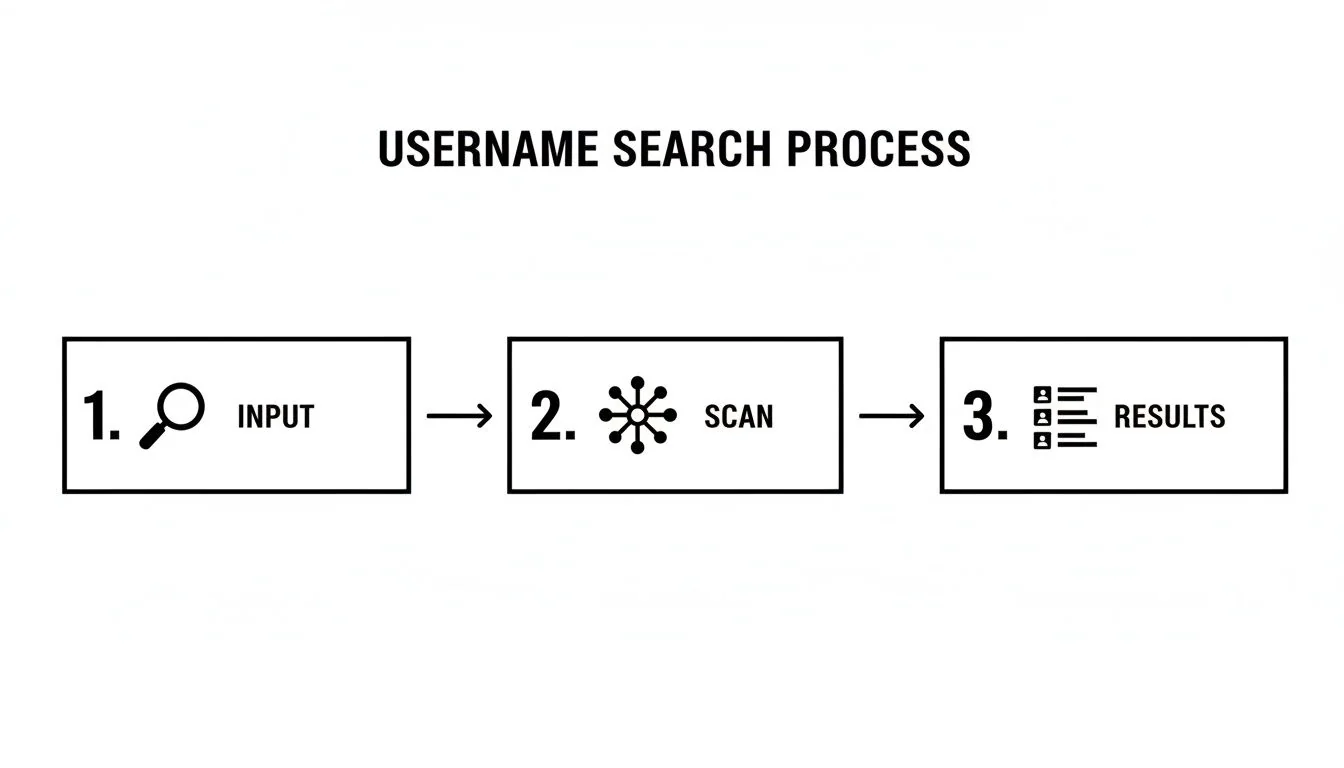
· Digital Footprint Check · Content Marketing · 13 min read
Discovery Account Queries: How to Find Hidden Profiles
Learn how to use discovery account queries to locate hidden or forgotten online profiles. Step-by-step tips for finding accounts you didn't know existed.

You're checking a job applicant's name before an interview, or trying to understand whether an unfamiliar profile belongs to someone you know. A search turns up a familiar username. It's tempting to treat that result as an answer. In careful open-source research, it's only a lead.
Discovery account queries are structured searches for accounts associated with a known identifier, such as an email address, phone number, or username. Their value doesn't come from finding a match quickly. It comes from distinguishing a possible match from an account you can responsibly attribute to a person.
What a Discovery Account Query Does
An account-discovery result gives you a candidate to assess. Its usefulness depends on whether the available evidence supports attribution, how current that evidence is, and what remains uncertain. A confident-looking profile can still leave the central question unresolved: who controls the account today?
A query maps candidate accounts linked to an identifier; it doesn't establish ownership on its own.
Consider an old gaming profile displaying an email address from a résumé. A shared family inbox or an account that changed hands could explain the overlap. The address provides a connection worth examining, while independent context determines how much weight that connection deserves. Repeated copies of the same profile information offer little additional corroboration.
NIST's digital identity framework separates identity proofing, which includes resolving an applicant's identity, from authentication, which establishes control of an authenticator associated with an account. These are distinct processes with different evidence requirements. NIST's digital identity guidance provides a useful boundary for discovery work: public identifier matches alone cannot establish a confirmed identity or demonstrate present account control.
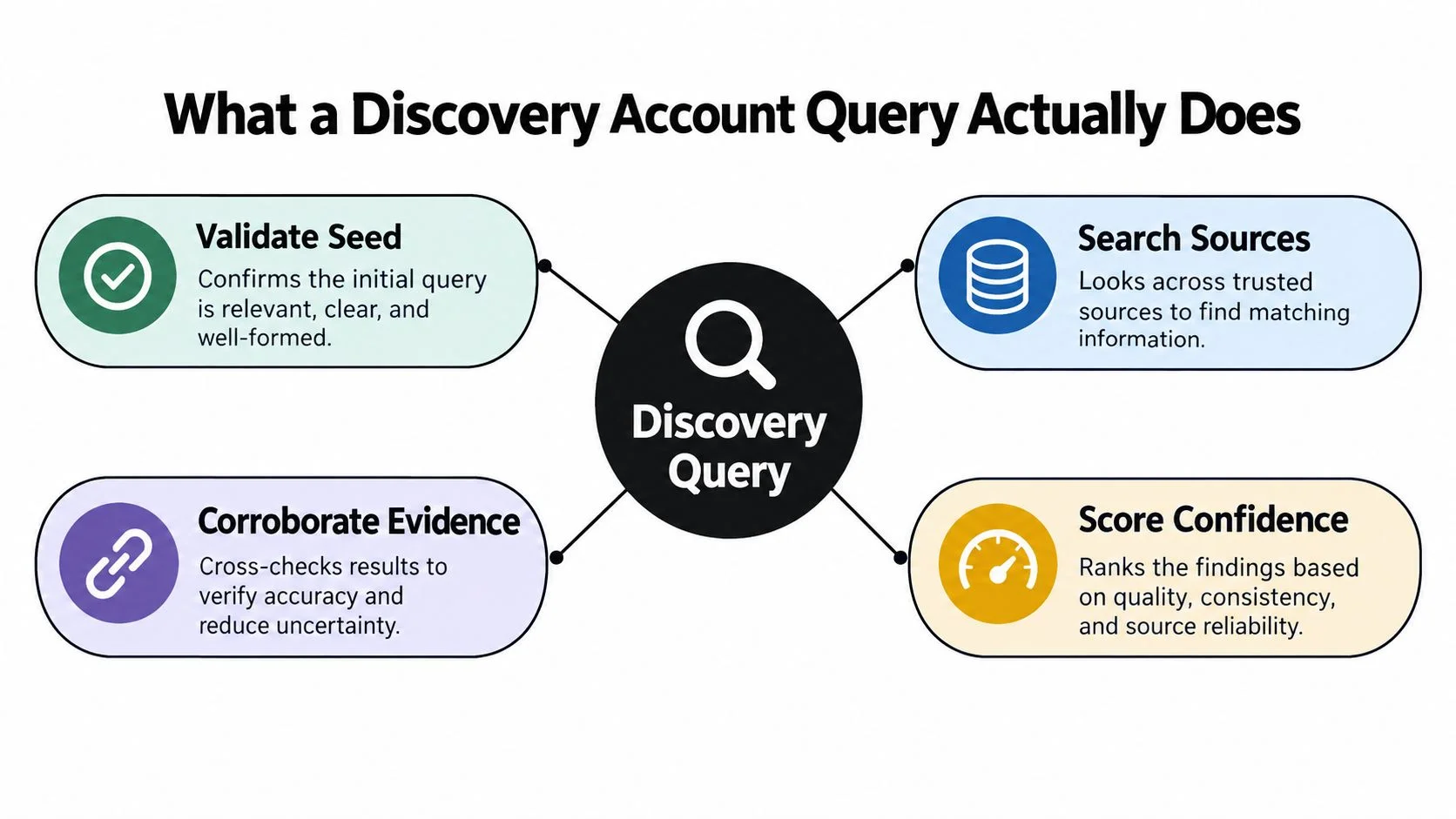
Keep discovery separate from account access
A public profile can reveal an identifier without establishing whether the account is active or its visible information is current. Account recovery serves another purpose: restoring access after authenticators are lost. Treating recovery mechanisms as investigative tools crosses that boundary.
Keep searches observational. Avoid login attempts, password-reset requests, or interactions intended to test who owns a profile. They can alert the account holder, alter evidence, and create legal or ethical problems. The gain in apparent certainty rarely justifies those risks.
A useful report separates the observed match from the attribution judgment. State what links the candidate to the subject, what independent context supports that link, and what prevents a firmer conclusion. Confidence scoring should make those limits visible.
The outcome may be several plausible candidates, an inactive account, or no result meeting your attribution threshold. Record each outcome plainly. An unresolved finding preserves uncertainty and gives later research a defensible starting point.
The Three Identifier Types That Drive Discovery
Starting with a username is convenient, but it's not always the strongest first move. Choose the identifier that's most likely to be unique and relevant to the platforms you need to examine, then record where it came from and when you received it.
| Identifier | Best For | Common False Positives |
|---|---|---|
| Email address | Professional profiles, account-registration traces, and checking a person's own known addresses | Shared inboxes, aliases, old addresses, and recycled or exposed records |
| Phone number | Messaging services and profiles that use a number for discovery or verification | Reassigned numbers, family plans, formatting differences, and outdated listings |
| Username or handle | Gaming networks, developer communities, forums, and profiles that display a public handle | Common names, reused or sold handles, impersonation, and abandoned accounts |
Email addresses can provide a useful pivot when a person uses the same address for a professional profile, a personal blog, or a public developer account. But an email can be shared, used as an alias, or no longer controlled by the person associated with an older account. Treat an email match as a lead, and note whether the address was supplied by the subject or found elsewhere.
Phone numbers can be valuable where a service makes profiles discoverable by number. Normalize country-code and formatting variations before searching, and preserve the number's source and collection date. For a focused walkthrough of this approach, see finding social media profiles by phone number.
Usernames are often effective in gaming and developer spaces, particularly when a handle is unusual and appears alongside consistent profile details. A familiar handle still isn't decisive: people reuse names, accounts can change owners, and unrelated users may choose the same string.
Platform coverage also argues against stopping at one service. Pew Research Center's 2025 Social Media Fact Sheet, based on a survey of 5,022 U.S. adults, reported that YouTube and Facebook remained the most widely used platforms, half of adults used Instagram, and smaller but substantial shares used TikTok, Reddit, Snapchat, and X. The Pew Research Center fact sheet supports a practical point: online identities are often spread across services with different naming and privacy conventions.
Before searching, normalize the identifier. For email, record known aliases and plus-addressing variations without assuming they all resolve to the same person. For phone numbers, keep a consistent country-code format. For usernames, note likely spelling substitutions, but mark each variation as a search lead rather than a confirmed alias.
A Confidence-Scored Entity Resolution Workflow
A reliable workflow keeps discovery separate from attribution. NIST's digital-identity guidance supports a staged approach: validate the starting identifier, search using normalized variants, pivot from confirmed aliases, corroborate candidates independently, and record confidence. Reused, recycled, or sold handles can produce convincing but incorrect matches, so one hit should never carry the whole conclusion. See NIST's identity-proofing and risk-management guidance.
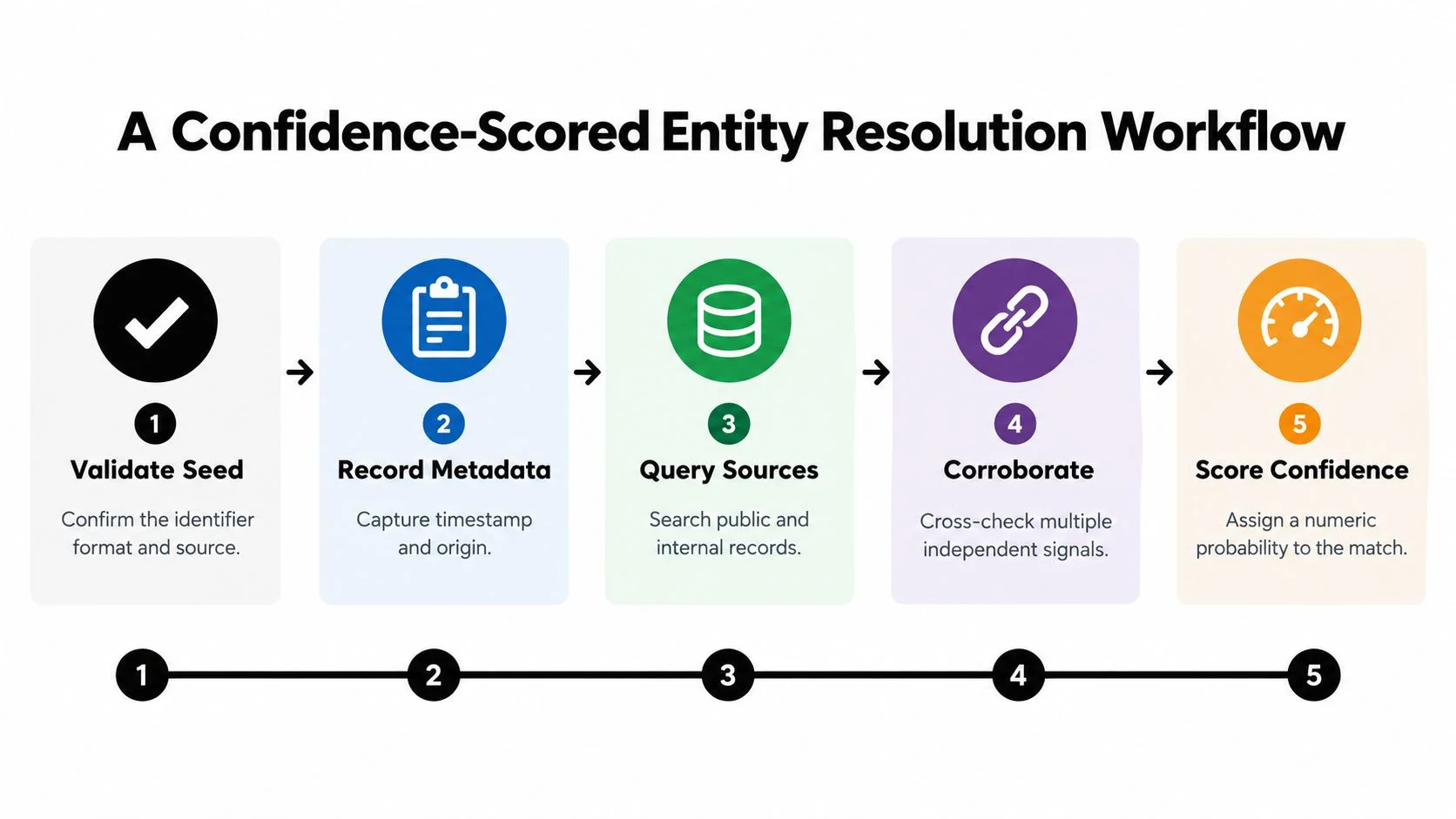
Move from seed to candidate
Validate and document the seed. Check that the email, phone number, or username is correctly transcribed. Record its provenance: who supplied it, where it appeared, and the date you collected it. A search result is only as reliable as the starting information.
Normalize and query. Create a controlled list of reasonable variants, then search platforms with identifiers likely to distinguish one account from another. Keep the original value and each variant separate in your notes. Don't turn a speculative spelling into a confirmed alias.
Pivot carefully. A candidate profile may contain another handle, a linked website, or an email address. Pivot from that information only when the connection itself has support. A display name, by itself, usually isn't a reliable bridge between accounts.
Corroborate, then assign a status
Look for independent signals such as consistent profile history, account dates, language, geography, linked accounts, or chronology. A signal is useful when it adds information beyond the identifier that generated the candidate. Several copies of the same username across search results aren't several independent confirmations.
Use three clear reporting states:
- Candidate: A search returned a plausible account, but identity evidence is limited.
- Corroborated: Independent details support the connection, but the evidence doesn't establish the owner conclusively.
- Confirmed: The available evidence meets your defined attribution standard, with the limits and source history documented.
For practical quality control, require at least two or three independent corroborating indicators before reporting an account as attributable. Preserve timestamps, since phone numbers can be reassigned and accounts can change ownership. NIST also treats identifiers linked to a specific person as personally identifiable information, so keep collection purpose-limited, access-controlled, and documented.
Practical rule: Confidence describes the evidence you have. It doesn't grant permission to access an account or prove who controls it.
Practical Search Strings and Pivots You Can Run Today
Search operators can narrow public results, but they don't verify identity. Use them to find pages worth assessing, not as an automated attribution system. If you need a broader primer on responsible methods, see this guide to using OSINT in a structured way.
Try these public-search patterns, adapting the terms to the platform's current syntax:
- Google:
site:github.com "handle"orsite:linkedin.com/in "name" "employer" - X:
site:x.com "handle"orsite:twitter.com "handle" - Reddit:
site:reddit.com/user "handle"orsite:reddit.com/r "topic" "handle" - GitHub:
site:github.com "handle" language:Pythonorsite:github.com "email"
Operators and platform behavior change. Confirm that a result points to the service and account you intend to assess. Don't assume search-engine rank, a snippet, or a cached page proves ownership.
A cautious pivot example
Start with an email address you're authorized to assess. A public search surfaces a LinkedIn profile with that address, but don't stop there: compare the profile's public career history with information independently known from the legitimate context of the search. If the connection is plausible, record it as a candidate until additional evidence supports it.
The profile displays a name. Searching GitHub for that name returns several possible accounts, so the name alone does little to narrow the field. One candidate's public commit references a personal blog; the blog links back to a GitHub account with the same handle. Those reciprocal links offer more meaningful corroboration than a search-result match, though they still don't establish who currently controls either account.
If you're assessing media rather than identity, provenance matters too. A resource on how to locate a video's origin can help distinguish an original upload from a repost before you use a clip as contextual evidence.
Archive tools can reveal historical usernames and page versions, but old captures describe what was visible at a past point in time. Treat dates as part of the evidence, not as proof of present ownership. Automated discovery benchmarks also deserve caution: an industry guide's approximate coverage and false-positive claims aren't independently validated as universal performance figures. A responsible evaluation measures precision and recall on a consented test set, as discussed in guidance on digital-footprint searches.
Why a Single Match Is Not Proof of Ownership
A username match answers a narrow question: does this string appear on a service? It doesn't answer who created the account, who controls it now, or whether the account is relevant to your purpose. A careful workflow keeps those questions separate.
A discovery hit can describe several different situations:
- Probable account identifier: The identifier appears associated with an account, but ownership still needs corroboration.
- Inactive or abandoned account: A profile exists, but there's no evidence it's currently used or controlled by the person you're researching.
- Exposed credential: A record indicates that a credential appeared in an exposure, which doesn't establish present account access or current compromise.
- Verified account owner: Multiple independent signals support attribution under a documented standard.
The difference matters when a search turns up alarming breach material. The widely reported 16-billion-credential dataset was largely an aggregation of previously stolen and recycled credentials, not one new breach. A record's appearance therefore doesn't establish current compromise, even though an old reused password can still put an account at risk. The background on that aggregation is covered in reporting on the credential dataset.
| Shortcut | What it can show | What it can't establish |
|---|---|---|
| Search by one username | The same string appears in a public result | That one person owns every matching profile |
| Look up an email in breach data | A record may be associated with an address | That the account is active or currently compromised |
| Corroborate independent details | Multiple signals support a connection | Absolute certainty about who controls an account today |
Shared family emails and corporate aliases can connect unrelated activity. Recycled handles can link a new owner to an old account's history. Even a genuine match may be stale, copied, or impersonated, so preserve the candidate's source and date before drawing a conclusion.
When an unexpected result raises concerns, use a disciplined social media investigation approach. Ask what the evidence establishes, what remains unknown, and whether the next action is safe and lawful. Don't try to test a discovery by accessing an account without authorization.
Ethics, Consent, and the Limits of Discovery
Publicly visible doesn't mean fair game for every purpose. A professional profile shared to support someone's work may be relevant to a hiring question; sensitive personal material may be irrelevant, misleading, or harmful to use. Before searching, define the legitimate purpose and what kinds of information you'll exclude.
Recent reporting indicates that roughly seven in ten employers review candidates' social-media profiles, while more than two dozen U.S. states restrict employers from requesting passwords or access to private accounts. That context, summarized in guidance on employer social-media checks and legal rights, makes one boundary clear: public availability isn't permission, proof of identity, or evidence that a detail is job-relevant.
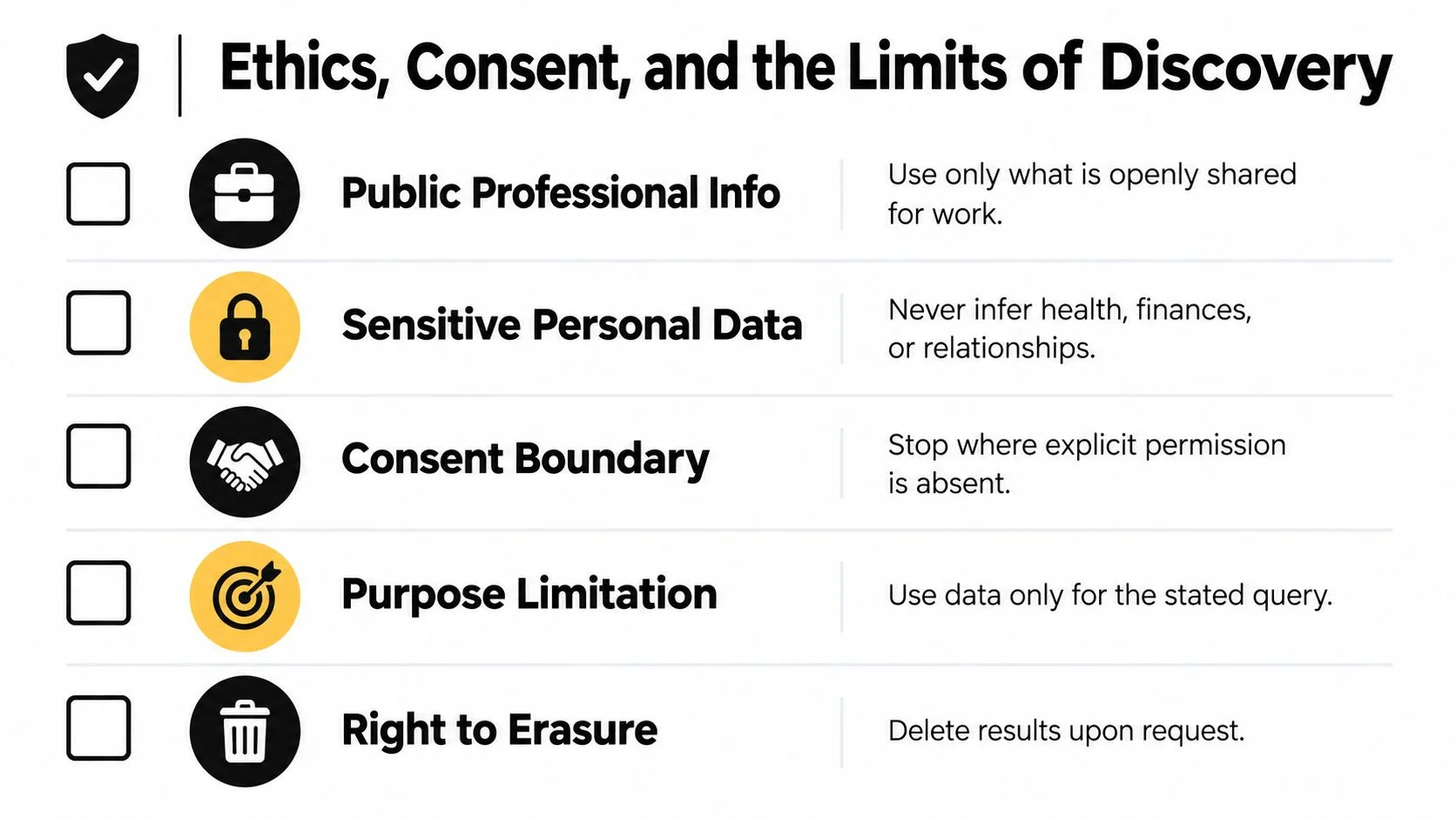
Keep the process proportionate
For HR, use consistent, job-related criteria; verify identity before attributing profiles; record collection dates; and make sure a human reviews any finding that could affect a hiring decision. Avoid decisions based on protected characteristics or speculative inferences about someone's health, finances, relationships, or personal life. If an adverse decision is being considered, follow an auditable process suited to applicable law.
For personal or relationship searches, consider whether you have consent and a legitimate reason to look. A search shouldn't become a pretext for stalking, deception, or gaining access to private accounts. If personal safety is at stake, prioritize support from trusted people and appropriate authorities rather than escalating a risky investigation.
Green flags include using openly available information for a defined purpose, recording evidence and uncertainty, limiting access to findings, and honoring correction or deletion requests. Red flags include using passwords or password-reset flows, misrepresenting yourself to gain access, collecting sensitive information without a clear need, or treating an ambiguous match as proof of misconduct.
NIST's broader identity framework recognizes that processing personal information can create privacy risks. A responsible query therefore limits what it collects, protects what it retains, and gives people a way to challenge a mistaken attribution. For an overview of the boundaries, consult this guide to OSINT legality.
What to Do After a Discovery Hit
A hit needs triage, not panic. Start by checking the source and date, then work through these actions for accounts and identifiers you control:
- Verify the record. Confirm the provider, identifier, and date. An old or recycled record may describe past exposure rather than current access.
- Change reused passwords through the legitimate service, and use a unique password for each account.
- Enable multifactor authentication where the provider offers it.
- Revoke active sessions you don't recognize, using the provider's security settings.
- Review forwarding rules and connected applications for changes you didn't make.
- Request correction or deletion from the relevant service or data holder when appropriate. If an old profile is no longer needed, follow a safe process for deleting old accounts.
Verizon's 2025 Data Breach Investigations Report found that credential abuse accounted for 22% of breaches and that the human element was involved in about 60% of breaches, reinforcing the value of unique passwords, multifactor authentication, and regular exposure checks. See the 2025 DBIR executive summary.
Use the evidence to protect accounts, not to make unsupported accusations. Keep a brief record of what you checked, what you changed, and what still needs follow-up.
Digital Footprint Check offers a profile checker that searches public sources for accounts and exposure associated with identifiers such as an email address, phone number, or username. Visit Digital Footprint Check to run a free check, review the surfaced results as candidates, and decide which legitimate account-security steps to take next.


![User Search: Find Anyone Online with These OSINT Techniques [2025 Guide]](/images/blog/user-search.webp)