· Digital Footprint Check · Content Marketing · 14 min read
Identity Theft Protection for Employees: a Practical Guide
Discover effective identity theft protection for employees with practical strategies, benefit programs, and response steps employers and staff can implement

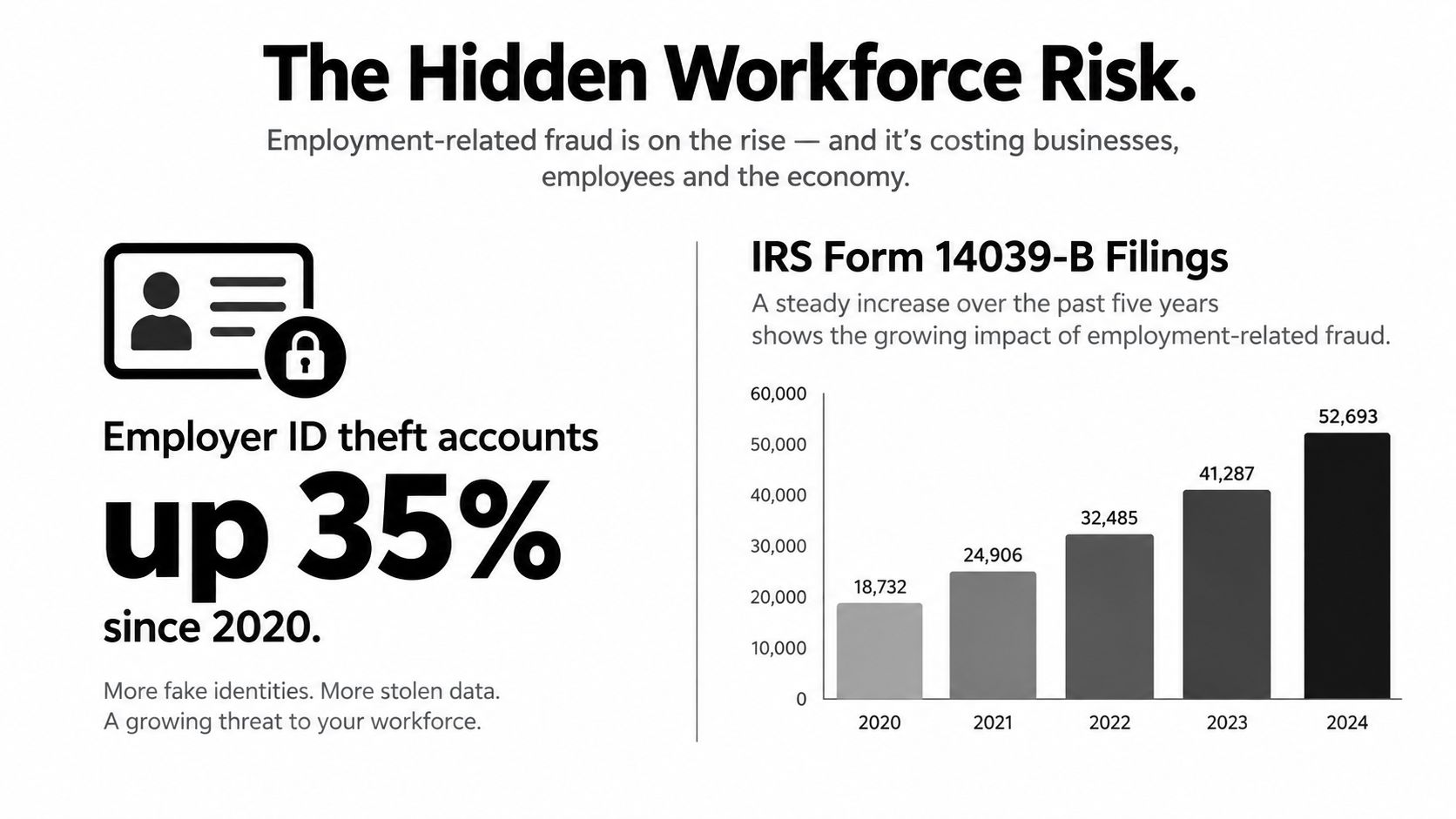
Employment-related identity theft isn’t a minor employee perk issue. The Federal Trade Commission’s employment-related fraud reference reports more than 80,000 employment or tax-related identity-theft reports in 2025, while a separate security review recorded 37,556 employment-related identity-theft cases in 2024, up 20% year over year (Security.org identity-theft statistics). Employers hold the payroll, tax, benefits, address, and banking data criminals need, so employee identity protection belongs inside the security program, not in a brochure nobody reads.
A sensible program follows the employee lifecycle. It starts before a worker receives credentials, continues through role changes and payroll activity, and ends only after systems, vendors, devices, and payment instructions have been reconciled. Monitoring has a role, but it won’t stop every fraudulent account or explain an incomplete breach notice. Employers need controls that prevent misuse, detect exposure quickly, and give employees practical recovery support.
Why Employee Identity Theft Is Now a Workplace Risk
Employment fraud has become a measurable workforce exposure. The FTC reference above records over 80,000 employment or tax-related identity-theft reports in 2025, and Security.org reports 37,556 employment-related cases in 2024, with cases increasing 20% year over year. Those figures describe reported complaints, not the full problem. Unreported wage diversion, fraudulent unemployment claims, compromised benefits accounts, and stolen tax information can remain invisible until an employee notices a missing payment or an unexpected government letter.
The workplace connection is also well established. An InfoArmor analysis of employer-held personal information states that 65% of data breaches in 2019 resulted in stolen personal information, compromising the identities of more than 14.4 million people, and cites an industry estimate that as much as 50% of identity theft originates in the workplace. The same analysis notes that U.S. breaches exposed more than 1.4 billion personal-information records between 2010 and 2020.
Why payroll data keeps creating risk
A W-2, Social Security number, home address, date of birth, bank account, and benefits record can support several kinds of fraud. Criminals may redirect wages, submit unemployment claims, open financial accounts, impersonate an employee with a benefits provider, or combine exposed details with other stolen information. The data also has a long half-life. Changing a password won’t replace a compromised SSN or erase copies of an old tax form.
Remote work adds operational complexity. Employees may access payroll or benefits portals from personal devices and networks, while HR teams coordinate with payroll processors, benefits administrators, recruiting vendors, and background-check providers. Each handoff creates another place where access permissions, support tickets, exports, and retention practices can fail.
Practical rule: Treat employee PII as a business asset with an owner, an access policy, a retention limit, and a response deadline.
State breach-notification obligations and the FTC Safeguards Rule create legal and operational pressure, but compliance alone isn’t a protection strategy. Employees need clear notification, usable recovery instructions, and a way to report suspicious activity without navigating several departments. Employers need a coordinated program that combines identity controls, vendor oversight, employee education, and incident response. A practical starting point is an employee identity-risk assessment that identifies exposed information and prioritizes remediation.
The Core Protection Workflow for HR and IT
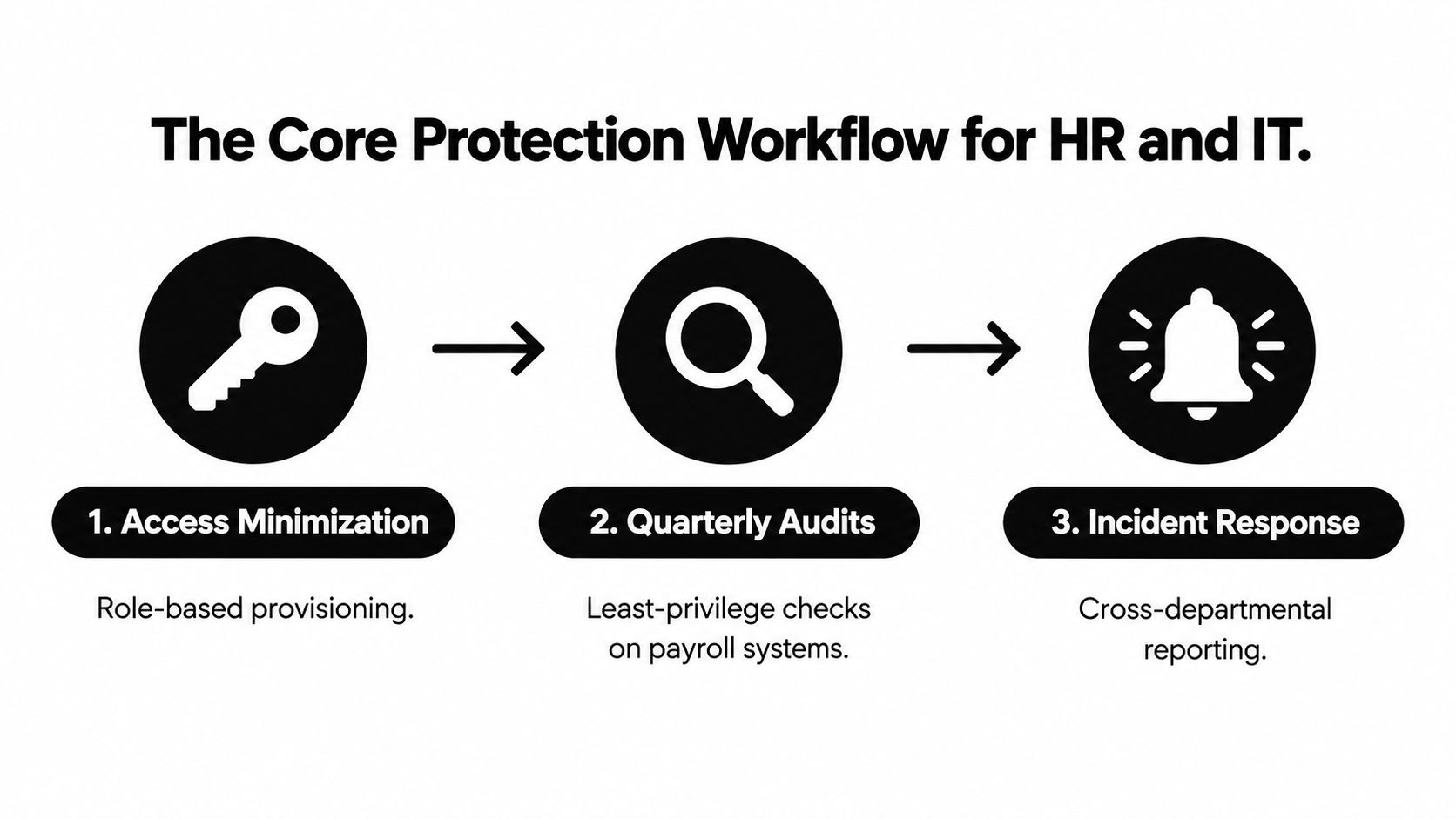
HR and IT should run one workflow, not separate checklists. HR understands why the organization collects employee data and when it changes. IT controls identity systems, authentication, devices, logs, and access. Payroll and benefits teams add transaction-level knowledge. If those groups don’t share ownership, an attacker can exploit the gap between a personnel record and the account connected to it.
Start with access minimization
Create an inventory of systems that store or transmit employee PII. Assign access by job role, not convenience, and remove broad permissions from people who only need a narrow function. Centralize requests for employee data so HR can verify the purpose, requester, and approval before releasing anything.
Sensitive files and emails should use encrypted storage and protected transmission. Require strong passphrases of at least 12 characters, multi-factor authentication, and secure handling for documents containing SSNs, bank data, or tax details, following the practical guidance summarized by the Identity Theft Resource Center for businesses. Prefer phishing-resistant MFA, such as hardware security keys or platform passkeys, for administrators and anyone changing payroll or benefits information.
Audit the controls, not just the policy
Run quarterly entitlement reviews across payroll, benefits, HRIS, ticketing, shared drives, and vendor portals. Check for shared service accounts, stale administrator tokens, dormant contractor accounts, and screenshots of W-2s inside support tickets. Ask vendors whether production PII is copied into testing or training sandboxes, and require deletion when the information is no longer necessary.
Your quarterly checkpoint should confirm:
- Access ownership: Every privileged account has a named owner and a documented business purpose.
- Authentication coverage: MFA is enforced for every account that can view or change employee PII.
- Data handling: Sensitive files are encrypted, retention rules are active, and unnecessary exports are deleted.
- Vendor notification: Contracts and internal service-level agreements require prompt reporting of suspected exposure.
- Employee response: Staff know how to report a suspicious payroll request or compromised credential.
Place the response path where employees can find it before an incident. A short form, a monitored security address, and a phone escalation route are more useful than a long policy stored in an inaccessible portal. Teams reviewing account takeover prevention practices should also test whether their recovery process can revoke tokens and reset sessions across connected systems.
A visual walkthrough can reinforce the workflow:
Choosing the Right Controls for Your Benefit Program
Benefits leaders should stop treating every identity product as interchangeable. Monitoring detects signals. A credit freeze blocks new-account opening. Recovery support helps a person deal with the consequences. Those are different jobs, and a package that performs only one of them shouldn’t be described as complete protection.
FTC survey findings reported by SHRM in its employee identity-theft benefit guidance show that victims spent a median of four hours resolving problems, while 10% spent at least 55 hours. Half reported out-of-pocket losses, and 10% lost $1,200 or more. These findings support funding for remediation, not just alerts.
Identity Theft Controls Compared
| Control | What It Catches | Prevent vs Detect | Recovery Support | Typical Cost |
|---|---|---|---|---|
| Credit monitoring | New accounts, inquiries, and credit-file changes | Detects after activity is reported | Usually limited unless bundled | Varies by plan |
| Dark-web and SSN monitoring | Exposed credentials, SSNs, and listings in monitored sources | Detects exposure, doesn’t block account opening | Usually limited | Varies by plan |
| Fraud alerts and credit freezes | Alerts lenders or restricts access to a credit file | A freeze prevents new-account opening; an alert supports detection | Usually self-directed | Alerts and freezes may be available without a paid plan |
| Recovery and restoration services | Identity misuse that requires investigation, disputes, or documentation | Doesn’t prevent fraud by itself | Caseworker assistance, dispute support, and guidance | Varies by plan |
What to buy
Ask vendors how quickly a caseworker responds, whether support covers unemployment and medical identity theft, and whether dependents over 18 and international employees are eligible. Many programs look broad until you examine geography, family definitions, language support, or exclusions for non-credit fraud.
The sensible default is a freeze-on-demand policy paired with mid-tier monitoring. Employees should know how to freeze their files when exposure is credible, while monitoring can shorten the period before they notice suspicious activity. Premium recovery support makes sense for organizations with complex payroll, distributed workforces, or limited internal capacity, but don’t pay for features that don’t cover the identities and systems your workforce uses in practice.
Review whether identity theft protection works in practice by asking one blunt question: does the benefit prevent a fraudulent account, detect it quickly, or help repair the damage? If the answer is only “send an alert,” the program is incomplete.
Closing the Post-Hire Blind Spot
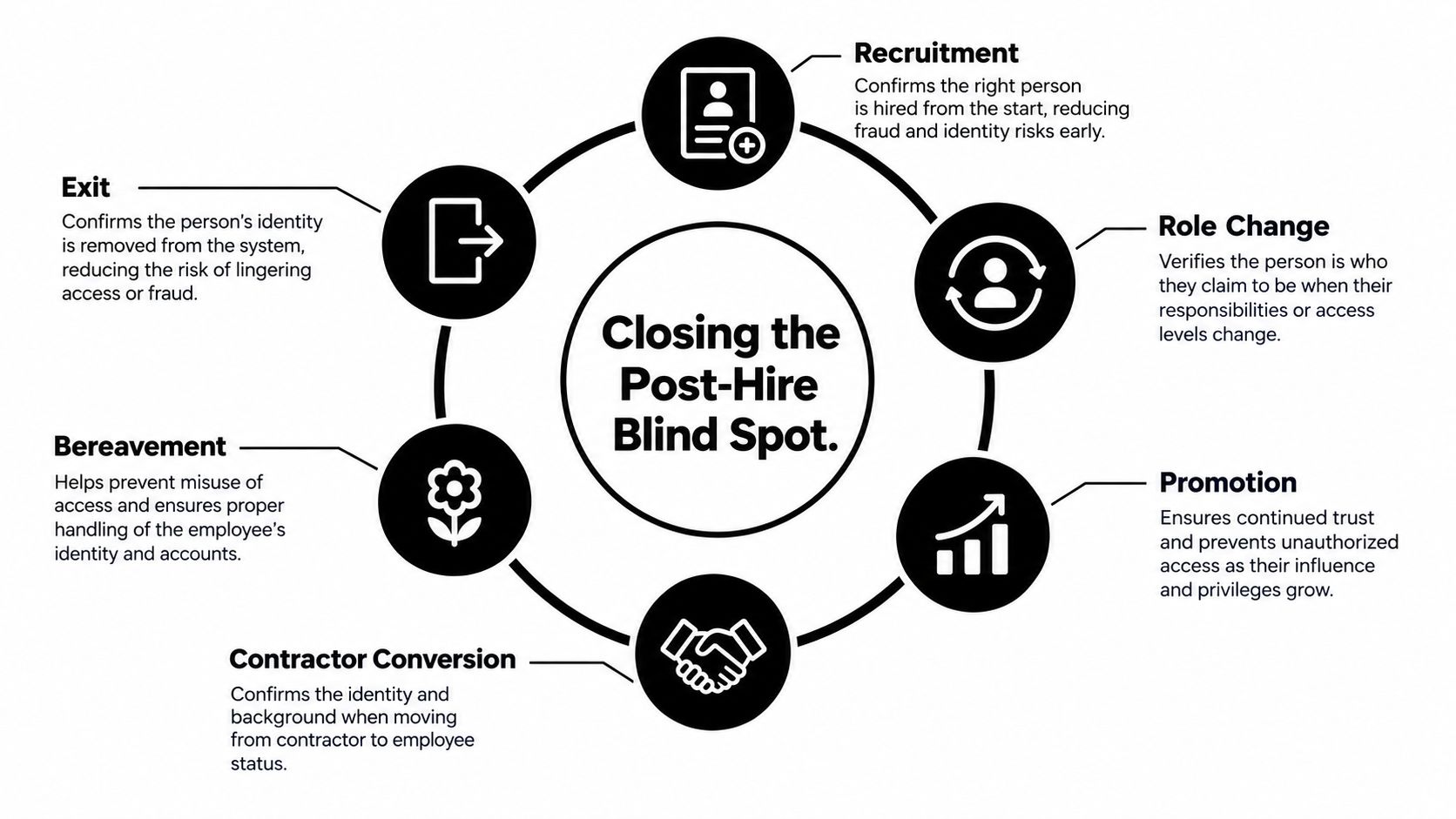
A background check or I-9 confirms a point in time. It doesn’t prove that the same person continues to authenticate to payroll, benefits, VPN, or administrator systems after a promotion, role change, contractor conversion, or exit.
Recent reporting identifies a 90-day gap between hiring and onboarding as an enterprise identity-security blind spot and states that 98% of fraudulent hires already have company credentials when detected (Help Net Security’s hiring-fraud report). The practical lesson is straightforward. Identity proofing must continue after recruitment and before high-risk transactions.
Verify at meaningful lifecycle events
Use risk-based checks when a person moves through the organization:
- Recruitment: Verify identity consistently and protect candidate data from unnecessary exposure.
- Role change: Reassess access when responsibilities change, especially for payroll, finance, HR, or security roles.
- Promotion: Require fresh approval for privileged access instead of inheriting old permissions.
- Contractor conversion: Reconcile the contractor record with the employee identity and remove duplicate accounts.
- Bereavement: Flag unusual changes to beneficiaries, addresses, or payment details for human review.
- Exit: Confirm that access removal, device recovery, payroll changes, and vendor records all agree.
Annual reverification can be tied to performance reviews, but event-driven checks matter more when risk changes suddenly. Bind SSO to managed devices where appropriate, review address-of-record changes made through payroll self-service, and require vendor-supplied identity-proofing events for sensitive transactions.
An offboarding ticket is not complete when SSO is disabled. It is complete when payroll, benefits, devices, vendors, and payment instructions agree that the relationship has ended.
The common failure is revoking VPN and SSO access while leaving direct-deposit routing untouched. A departing worker, compromised account, or malicious insider may still redirect funds through a separate payroll workflow. Cross-system reconciliation should compare the leaver’s status, last expected pay, bank details, active sessions, and vendor access.
This lifecycle approach also protects employees beyond company systems. A dark-web credential monitoring review can identify exposed credentials that may be reused across personal and workplace accounts, but it should complement, not replace, strong identity proofing and access governance.
Training, Onboarding, and Offboarding Practices
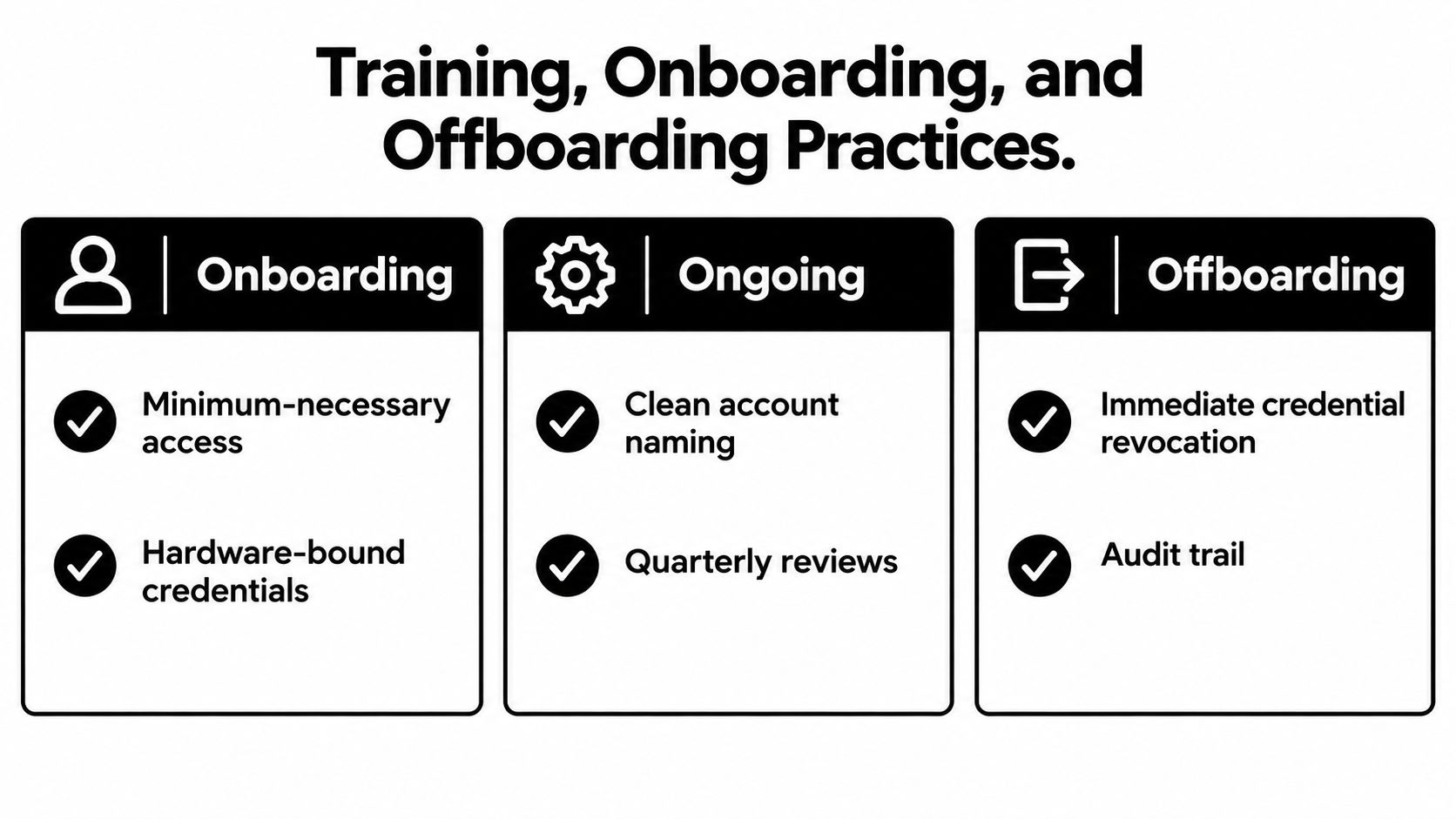
Security training fails when it describes threats without changing employee behavior. HR should give workers a short operating rulebook at onboarding, reinforce it during employment, and use offboarding as a controlled security event rather than an administrative afterthought.
Onboarding standards
Provision only the access required for the first role. Use hardware-bound credentials or passkeys for sensitive accounts, choose account names that don’t reveal tenure or the organizational chart, and document how employees must handle PII. A Day-1 phishing simulation establishes a baseline and gives managers a concrete coaching opportunity.
Employees should know that HR and IT won’t request a password, MFA code, or full SSN over email or chat. That rule should appear in the welcome material, payroll instructions, and benefits communications. Attackers imitate legitimate workflows, so employees need a reliable way to verify a request through a known channel.
Ongoing habits
Use short quarterly micro-modules rather than annual training that employees forget. Simulate vishing and vendor-impersonation messages involving payroll, benefits, direct deposit, and tax documents. Review near misses without humiliating employees, then adjust controls when the same confusion appears repeatedly.
Clean account naming and quarterly access reviews also belong in routine maintenance. A dormant contractor account, an old forwarding rule, or a support ticket containing a document image can defeat an otherwise strong MFA program.
Offboarding discipline
Run a same-day checklist that disables SSO and VPN, reassigns or wipes devices, audits shared drives and ticketing tools, and records the disposition of tokens and recovery methods. Lock direct-deposit changes for 30 days after termination when operationally feasible, then run a final payroll audit against the leaver’s expected pay.
Don’t forget contractors whose accounts may not flow through the employee HR system. Keep a 90-day re-verification window after termination for payment, vendor, and access records, with a named owner responsible for closing exceptions. This catches delayed payroll activity and dormant accounts that a same-day disablement misses.
What to Do in the First 72 Hours After Suspected Compromise
Speed matters, but sequence matters more. A leaked credential dump, an unfamiliar benefits-portal login, an anomalous 401(k) address change, or a vendor notice naming an employee should trigger a controlled response. Don’t start by changing the email address on every account. If an attacker still controls the recovery path, that change can help them intercept the next reset.
Hours 0 to 4
The employee should reset the exposed credential from a trusted device, starting with the email account and any account where the password was reused. Pull a free credit report and place a fraud alert with one bureau. The alert should propagate to the other two nationwide bureaus, but the employee should still verify that each file reflects the request.
HR should preserve the vendor notice, suspicious messages, timestamps, and account-change evidence. Don’t delete the original email or rely on a screenshot without retaining the surrounding details.
Hours 4 to 24
Request an IRS Identity Protection PIN, freeze credit at all three bureaus, and inventory financial, payroll, retirement, insurance, and benefits accounts connected to the exposed identity. A freeze is the strongest consumer control for stopping new-account fraud. Alerts and monitoring help detect activity, but they don’t substitute for a freeze.
The employee should change reused passwords everywhere and enable two-factor authentication on critical accounts. HR should give written instructions and a named contact, not send the person between payroll, IT, benefits, and security without coordination.
Hours 24 to 48
HR triggers the internal playbook. IT revokes active tokens, rotates shared secrets, reviews recent payroll and benefits changes, and checks for suspicious forwarding rules or recovery methods. Security should notify the cyber insurer according to the policy and preserve evidence before systems are reset or rebuilt.
Hours 48 to 72
File an FTC report through IdentityTheft.gov, make a police report if financial loss occurred, and document the timeline for the insurer and any required state attorney general reporting. Employees who need help organizing disputes and recovery steps can consult a resource such as Superior Credit Repair victim resolution, while HR should confirm that any outside assistance protects confidentiality.
One 2026 breach report found that only 24% of H1 2026 breach notices disclosed information about the attack vector, the lowest rate recorded by that source (Defend-Id’s H1 2026 breach report). Employees therefore shouldn’t wait for a perfect explanation. Freeze first when risk warrants it, document what is known, and update the response as vendors provide more detail.
Building a Measurable Identity Protection Program
A benefit program earns its budget when leaders can show what it changes. Track recovery time, compromised-record cost, detection speed, and workforce readiness. These measures connect employee support to security outcomes without pretending that every incident can be prevented.
Identity Protection Metrics Dashboard
| Metric | Baseline Target | Data Source | Review Cadence |
|---|---|---|---|
| Mean recovery hours per incident | Establish the current median and outliers | Caseworker logs, HR tickets, employee surveys | Quarterly |
| Cost per compromised record | Establish direct response and support cost | Incident invoices, legal records, vendor reports | Quarterly |
| Time to detect fraudulent accounts using employee PII | Establish the current time from misuse to alert | Credit alerts, payroll logs, benefits investigations | Monthly and quarterly |
| Workforce completing phishing simulations | Establish current completion and reporting rates | Training platform and phishing-simulation reports | Quarterly |
Set the baseline in the first month. Pull historic HR and security tickets, ask recovery vendors for case data, and separate direct costs from employee time. Don’t hide outliers. A single prolonged recovery can expose a weakness in notification, vendor coordination, or case ownership.
Review the dashboard with HR, IT, payroll, legal, and finance. If recovery hours stay high, improve caseworker access and employee instructions. If detection takes too long, assess monitoring coverage and payroll-change alerts. If simulation participation is poor, make completion a management responsibility rather than another optional course.
Run this audit prompt list now:
- Vendor coverage: Which employees, dependents, contractors, and countries are excluded?
- MFA enforcement: Which PII-handling accounts lack phishing-resistant authentication?
- Offboarding age: How long do termination tickets remain open, and who owns exceptions?
- Exposure visibility: What do current breach and public-exposure scans show, and who acts on results?
- Recovery ownership: Can an employee reach one accountable person during the first day of an incident?
Use data breach monitoring guidance to evaluate whether alerts lead to a defined response, rather than just accumulating notifications. Digital Footprint Check can also scan public sources, breach databases, social platforms, professional networks, gaming profiles, and other services to identify information exposed about employees or individuals. Treat those findings carefully, with lawful purpose, access controls, and respect for employee privacy.
Identity theft protection for employees is an insurance line item with measurable loss avoidance. The strongest programs reduce recovery friction, narrow detection time, and prevent avoidable account changes. They don’t promise perfect safety, and they don’t mistake a dashboard for control.
Use Digital Footprint Check to review exposed personal information, compromised-account signals, and public digital-footprint risks connected to your workforce. Start with the free checker, document the findings, and turn the results into clear remediation steps for HR, IT, and affected employees.